To get the first day of the month last month use this:
select TRUNC(ADD_MONTHS(SYSDATE, - 1), 'MONTH')FROM DUAL
To get the last day of the month, use this:
select LAST_DAY(ADD_MONTHS(SYSDATE, - 1))FROM DUAL
Friday, May 30, 2008


Tuesday, May 20, 2008
One of my main irks with Oracle Warehouse Builder (OWB)
One of my main irks with Oracle Warehouse Builder (OWB) is the lame messages you receive. I mean seriously, they can leave you with a sense of what hell does that mean and frustration to the point of pulling your hair out.
My case in point today was I had a function with a parameter that returns back a number that is to be used in a wait activity (figure 1). Sound simple enough doesn’t? Wrong. So you can see in figure2 the parameter for the function. And in Figure 3 you can see the binding of wait time to this return parameter.
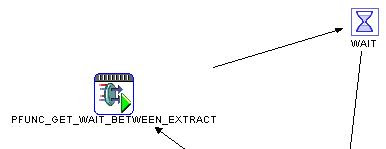
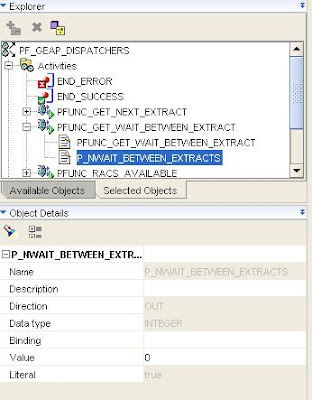
figure 2
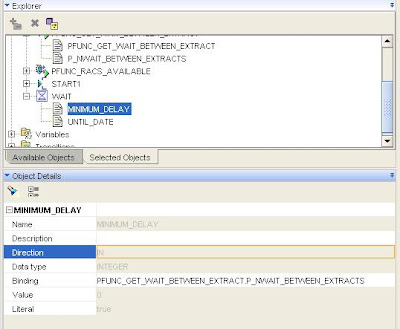
figure 3
Validation of the map was ok. I then deployed the map but that failed. The reason?
GEAP_WRK CreateError RPE-02040: Internal error: P_NWAIT_BETWEEN_EXTRACTS cannot be converted to a constant value. Please correct the value. If the problem persists then please contact Oracle Support with the stack trace and details on how to reproduce it.
See what I mean, this helps no one understand what the problem is or how to fix it. Fortunately I have run across this problem before so I pretty much know what to do. In this case you need to create a process flow variable and bind the parameter to this value. Then you need to bind the wait time property to this variable.
My case in point today was I had a function with a parameter that returns back a number that is to be used in a wait activity (figure 1). Sound simple enough doesn’t? Wrong. So you can see in figure2 the parameter for the function. And in Figure 3 you can see the binding of wait time to this return parameter.

figure 1

figure 2

figure 3
Validation of the map was ok. I then deployed the map but that failed. The reason?
GEAP_WRK CreateError RPE-02040: Internal error: P_NWAIT_BETWEEN_EXTRACTS cannot be converted to a constant value. Please correct the value. If the problem persists then please contact Oracle Support with the stack trace and details on how to reproduce it.
See what I mean, this helps no one understand what the problem is or how to fix it. Fortunately I have run across this problem before so I pretty much know what to do. In this case you need to create a process flow variable and bind the parameter to this value. Then you need to bind the wait time property to this variable.
Error messages when there are no errors in OWB
It appears that oracle warehouse builder (OWB) will tell you have an error even though there is no error. Case in point, while creating a process flow, I had a Stored Procedure from a package returning back a Boolean value. I use this return value to determine the transition to the next activity as seen in figure 1.
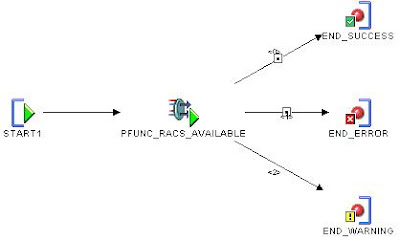
figure 1
I set the complex condition "PFUNC_RACS_AVAILABLE"."P_BAVAILABLE" for end with success. I then set the end with errors with NOT "PFUNC_RACS_AVAILABLE"."P_BAVAILABLE" . Finally I set no condition for end with warnings. But when I did a validation on the condition, OWB said I had an error in the expression (figure2). The error was PLS-00530: Illegal type used for object.
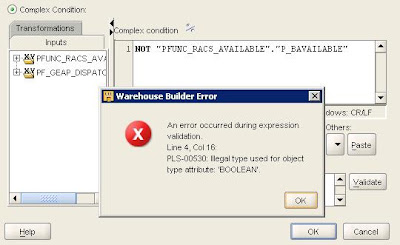
figure 2
Now since I have been working in OWB for a while, I have learned oracle not only gives bad error messages, but incorrect ones as well. Therefore I question most messages from Oracle and decided to test the process flow to make sure. In the figure below, the test shows the flow did work correctly. The second test I simply reversed the conditions between success and errors.
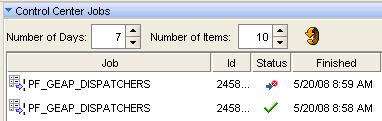
figure 3
As another test I checked the results in the control center to see what was returned from the procedure. Sure enough, a Boolean value was returned. I even reversed what was return to make sure I would be getting a false value (see figure 4).
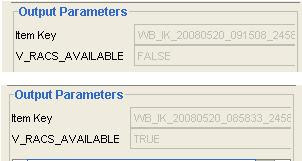
figure 4

figure 1
I set the complex condition "PFUNC_RACS_AVAILABLE"."P_BAVAILABLE" for end with success. I then set the end with errors with NOT "PFUNC_RACS_AVAILABLE"."P_BAVAILABLE" . Finally I set no condition for end with warnings. But when I did a validation on the condition, OWB said I had an error in the expression (figure2). The error was PLS-00530: Illegal type used for object.

figure 2
Now since I have been working in OWB for a while, I have learned oracle not only gives bad error messages, but incorrect ones as well. Therefore I question most messages from Oracle and decided to test the process flow to make sure. In the figure below, the test shows the flow did work correctly. The second test I simply reversed the conditions between success and errors.

figure 3
As another test I checked the results in the control center to see what was returned from the procedure. Sure enough, a Boolean value was returned. I even reversed what was return to make sure I would be getting a false value (see figure 4).

figure 4
Wednesday, May 14, 2008
q used to define a quote delimiter for PL/SQL
I don't know why I can never remember the 'q' for a quote delimiter, so I am putting it here for myself so I can easily find it.
q'';
DECLARE
s1 VARCHAR2(20);
s2 VARCHAR2(20);
s3 VARCHAR2(20);
BEGIN
s1 := q'[Isn't this cool]';
s2 := q'"Isn't this cool"';
s3 := q'|Isn't this cool|';
dbms_output.put_line(s1);
dbms_output.put_line(s2);
dbms_output.put_line(s3);
END;
source: http://www.psoug.org/reference/string_func.html
q'
DECLARE
s1 VARCHAR2(20);
s2 VARCHAR2(20);
s3 VARCHAR2(20);
BEGIN
s1 := q'[Isn't this cool]';
s2 := q'"Isn't this cool"';
s3 := q'|Isn't this cool|';
dbms_output.put_line(s1);
dbms_output.put_line(s2);
dbms_output.put_line(s3);
END;
source: http://www.psoug.org/reference/string_func.html
Monday, May 12, 2008
EVAL function
In several other languages I have written in, there is a native function that will evaluate an expression. Unfortunately, Oracle does not have this natively. From another web site I found a simple way to achieve this function.
create or replace function eval (expr varchar2)
return varchar2
as
ret varchar2(4000);
begin
execute immediate 'begin :result := ' || expr || '; end;'
using out ret;
return ret;
end;
source: http://www.adp-gmbh.ch/blog/2005/may/5.html
create or replace function eval (expr varchar2)
return varchar2
as
ret varchar2(4000);
begin
execute immediate 'begin :result := ' || expr || '; end;'
using out ret;
return ret;
end;
source: http://www.adp-gmbh.ch/blog/2005/may/5.html
Friday, May 9, 2008
So, you want to create a zip file in oracle?
My current project has me building a generic based extraction process in Oracle using OWB (Oracle Warehouse Builder). One of the issues is when an extract is so large it really needs to be compressed before any FTP activity occurs. The good news is you can. YEAH!!!!
The approach I took was utilizing Java, which can be used in Oracle. Being more of a C# developer, using Java is not that much of a stretch, but the debugging can be a real pain. I used SQL Developer and JDeveloper to create and Debug the code, which really gives poor error messages, if any at all. I am sure there must be a better way, and I will take some time in the future to find out how. Below is the code I used to take a path and filename and create a zip file in the same folder. There are a lot of write ups on this subject, but for me the best was located at http://www.javafaq.nu/java-example-code-224.html
You simple run this in SQLDeveloper to create a Java Class in the user schema. I place comments in the code to tell you what is happening. One of the things to really point out is the issue of parameters with an IN OUT. There is a great write up that helped me at http://www.cs.umbc.edu/help/oracle8/java.815/a64686/03_pub3.htm
create or replace and compile java source named "CreateZipFile"
as
import java.util.zip.ZipOutputStream;
import java.util.zip.ZipEntry;
import java.io.FileInputStream;
import java.io.FileOutputStream;
import java.io.*;
public class CreateZipFile
{
public static void DoCreateZipFile( String pPathAndFileName ,String[] pErrorMessage ,int[] pReturn)
{
int ReturnResults = 0;
String oZipFileName ;
byte[] buf = new byte[1024];
FileInputStream FIS = null;
ZipOutputStream ZOS = null;
try
{
//Create the path and file name for the zip file
oZipFileName = pPathAndFileName.substring(0,pPathAndFileName.lastIndexOf(".")) + ".zip";
// build the file objects
File oInFile = new File( pPathAndFileName);
File oOutFile = new File( oZipFileName);
//Create the output zip streams
FileOutputStream FOS = new FileOutputStream(oOutFile);
ZOS = new ZipOutputStream(FOS);
//Set the highest level of compression
ZOS.setLevel(9);
//Create an entry for the single file we are zipping up
ZOS.putNextEntry(new ZipEntry( oInFile.getName()));
//create the infile input stream
FIS = new FileInputStream( oInFile);
//Read in chucks of the input file and insert into the output file
int len;
while((len = FIS.read(buf)) > 0)
{
ZOS.write(buf, 0, len);
}
//close up the single entry
ZOS.closeEntry();
//Close in and out files
FIS.close();
ZOS.close();
}
catch (Exception e)
{
ReturnResults = 1;
pErrorMessage[0] = e.getMessage();
FIS.close();
ZOS.close();
}
finally
{
return ;
}
}
}
Now that you have created and installed the Java code, congrads, you can now zip a file,… almost. First you must create a spec for this method via an Oracle Procedure or Function.
create or replace
PROCEDURE jproc_Zipfile(pPathAndFileName in varchar2, pErrorMessage in out varchar2, pReturn in out NUMBER)
as language
java name 'CreateZipFile.DoCreateZipFile(java.lang.String,java.lang.String[],int[]) ';
Now that you have a spec for this method, congrads, you can now zip a file,… not quite yet. Next you have to give your user permission to interact with the file structure.
BEGIN
DBMS_JAVA.grant_permission('GEAP_PROJECT', 'java.io.FilePermission', 'J:\GEAP_EXTRACTS\', 'read ,write, execute, delete');
END;
Now that you have give your user permission, congrads, you can now zip a file,… finally (make sure about OS file permissions as well).
DECLARE
PPATHANDFILENAME VARCHAR2(200);
PERRORMESSAGE VARCHAR2(200);
PRETURN NUMBER;
BEGIN
PPATHANDFILENAME := 'C:\TEMP\danny2.csv';
PERRORMESSAGE := NULL;
PRETURN := NULL;
JPROC_ZIPFILE(
PPATHANDFILENAME => PPATHANDFILENAME,
PERRORMESSAGE => PERRORMESSAGE,
PRETURN => PRETURN
);
DBMS_OUTPUT.PUT_LINE('PERRORMESSAGE = ' PERRORMESSAGE);
DBMS_OUTPUT.PUT_LINE('PRETURN = ' PRETURN);
END;
There are a couple of caveats to point out at this point. To the best that I can tell, you cannot add a password protection using just the Java library, it just isn’t there. From what I am readying, this has been on the request list now for eight years.
Secondly, when I was creating this, I was in a windows environment. If you happen to test by hard coding the path such as 'C:\TEMP\danny2.csv', remember Java required double slashes, such as 'C:\\TEMP\\danny2.csv'
Hopefully I was able to hit on all the issues I ran across and that this article will help you. It’s Friday, and almost Beer time.
Danny
Subscribe to:
Posts (Atom)